Credit Note Management
Credit Notes in Hbl's simpleBillBook are used to process returns, issue refunds, or make adjustments to customer sales. They help maintain accurate customer accounts and inventory records when goods are returned or when price adjustments are needed after a sale.
Overview of Credit Notes
Credit Notes serve several important functions:
- Sales Returns: Process returns of sold goods from customers
- Refunds Issuance: Issue refunds for returned or unsatisfactory products
- Price Adjustments: Correct pricing errors from original sales
- Discount Application: Apply post-sale discounts or credits
- Warranty Claims: Process warranty replacements or credits
Viewing Credit Notes
To view all credit notes:
- Navigate to Manage Sales → Credit Note / Return... from the main sidebar
- You'll see a table listing all credit notes (empty if no credit notes exist)
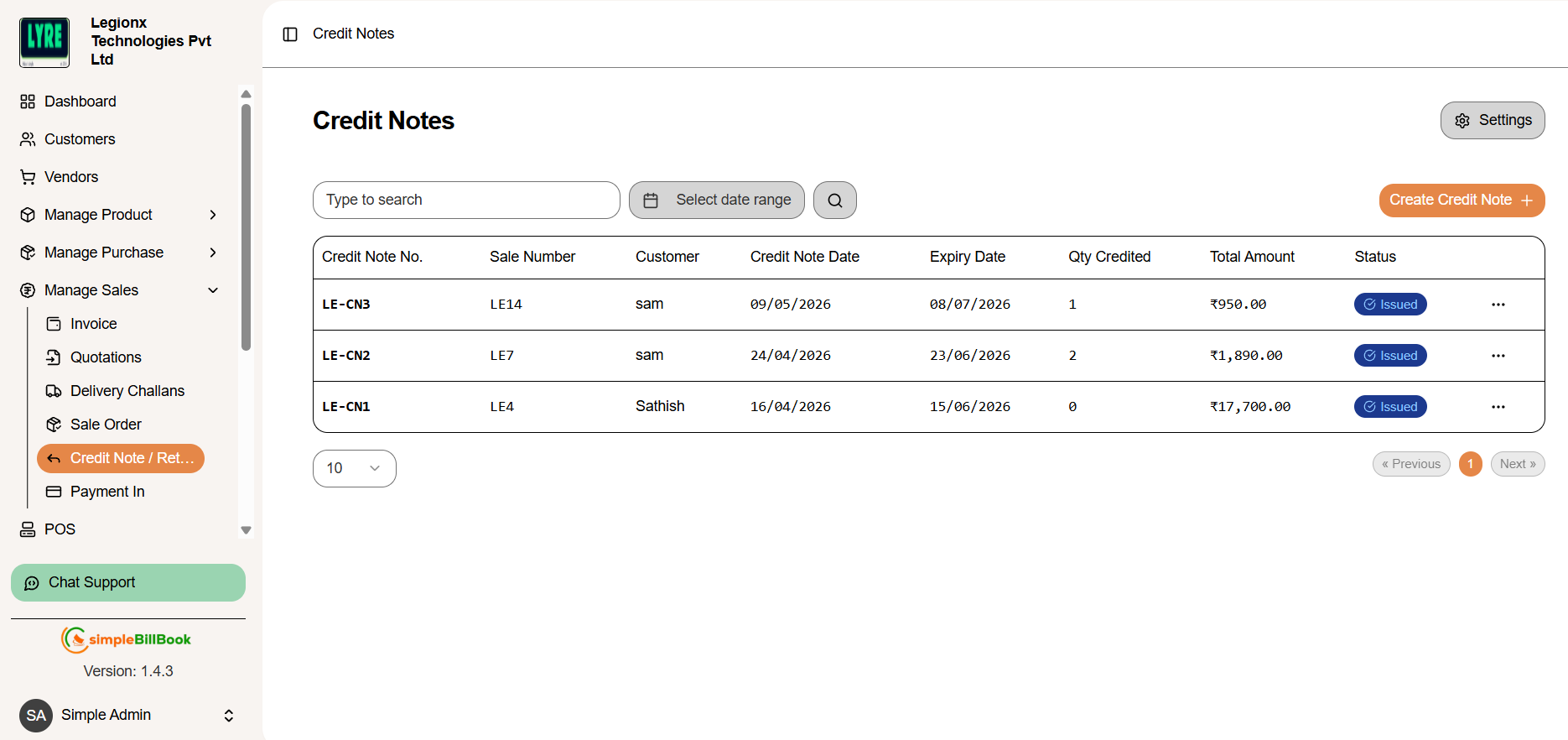 Figure 1: Credit notes list showing all credit notes with details
Credit Note Table Columns:
Identification Details:
- Credit Note No.: Unique identifier (e.g., CN1, CN2, CN3)
- Sale Number: Original sale invoice number (e.g., HBL1)
- Customer: Customer name
- Credit Note Date: Date when credit note was created
Quantitative Information:
- Qty Credited: Total quantity of items returned/credited
- Total Amount: Financial value of the credit note
Administrative Details:
- Expiry Date: Validity period for the credit note
- Status: Current status (Draft, Issued, Applied, Expired, Cancelled)
Interface Elements:
- Type to search: Search functionality for existing credit notes
- Select Date Range: Filter credit notes based on selected date range
- Previous/Next: Navigation buttons for pagination
- Empty State: "No results" message when no credit notes exist
- Pagination: Typically displays 10 items per page
Creating a New Credit Note
Step 1: Access Credit Note Creation
From the credit notes page, click Create Credit Note or similar button.
Step 2: Fill Credit Note Details
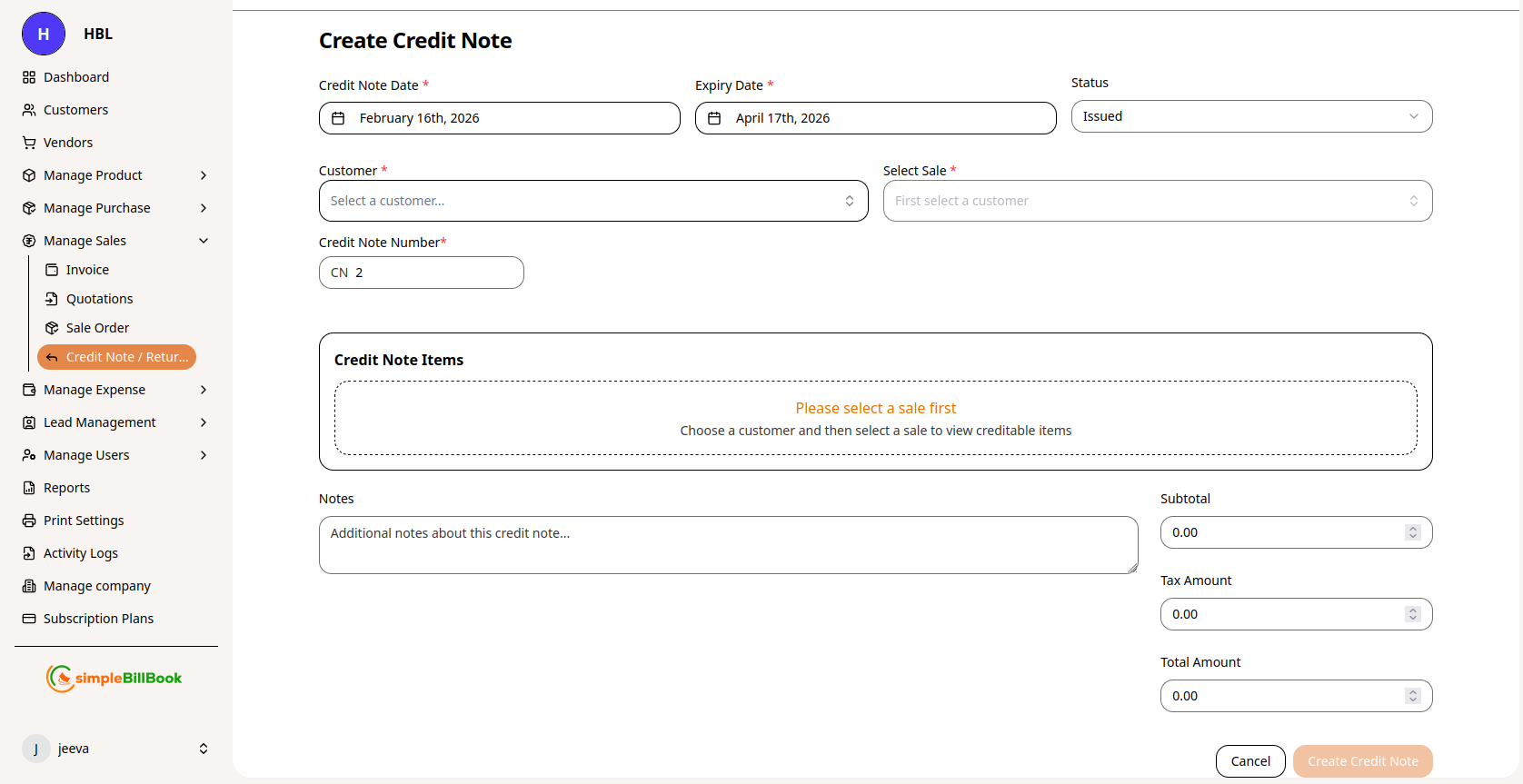 Figure 2: Form for creating new credit notes
Header Information:
- Customer*: Select customer from dropdown (required)
- Select Sale: Choose original sale invoice from customer's history
- Credit Note Date: Auto-filled with current date (editable)
- Expiry Date: Validity period for the credit note
- Credit Note No.: Auto-generated based on settings
- Status: Defaults to "Issued" or "Draft"
Sale Information Display:
- Credit Note for Sale: Shows original sale details (e.g., HBL1)
- Sale Details: Original sale date and amount
- Available Sales: Lists all sales eligible for credit notes
- Subtotal: Displays the total amount before tax calculation
- Tax Amount: Shows the total calculated tax amount
- Total Amount: Displays the final amount including taxes
Item Selection:
- Select Sale Item from original sale items
- Shows available quantity for return (e.g., "Available: 1")
- Enter quantity to credit/return
- System shows product details from original sale
- Click Add Item to add more items from the sale
Additional Information:
- Notes: Detailed explanation for the credit note
- Reason Code: Categorize reason for credit note
- Refund Method: How credit will be applied (refund, account credit, etc.)
Step 3: Save Credit Note
- Save as Draft: Save for later processing
- Issue Credit Note: Finalize and issue to customer
- Cancel: Discard the credit note
Credit Note Settings
Accessing Credit Note Settings
From the credit notes page, click Settings to configure defaults.
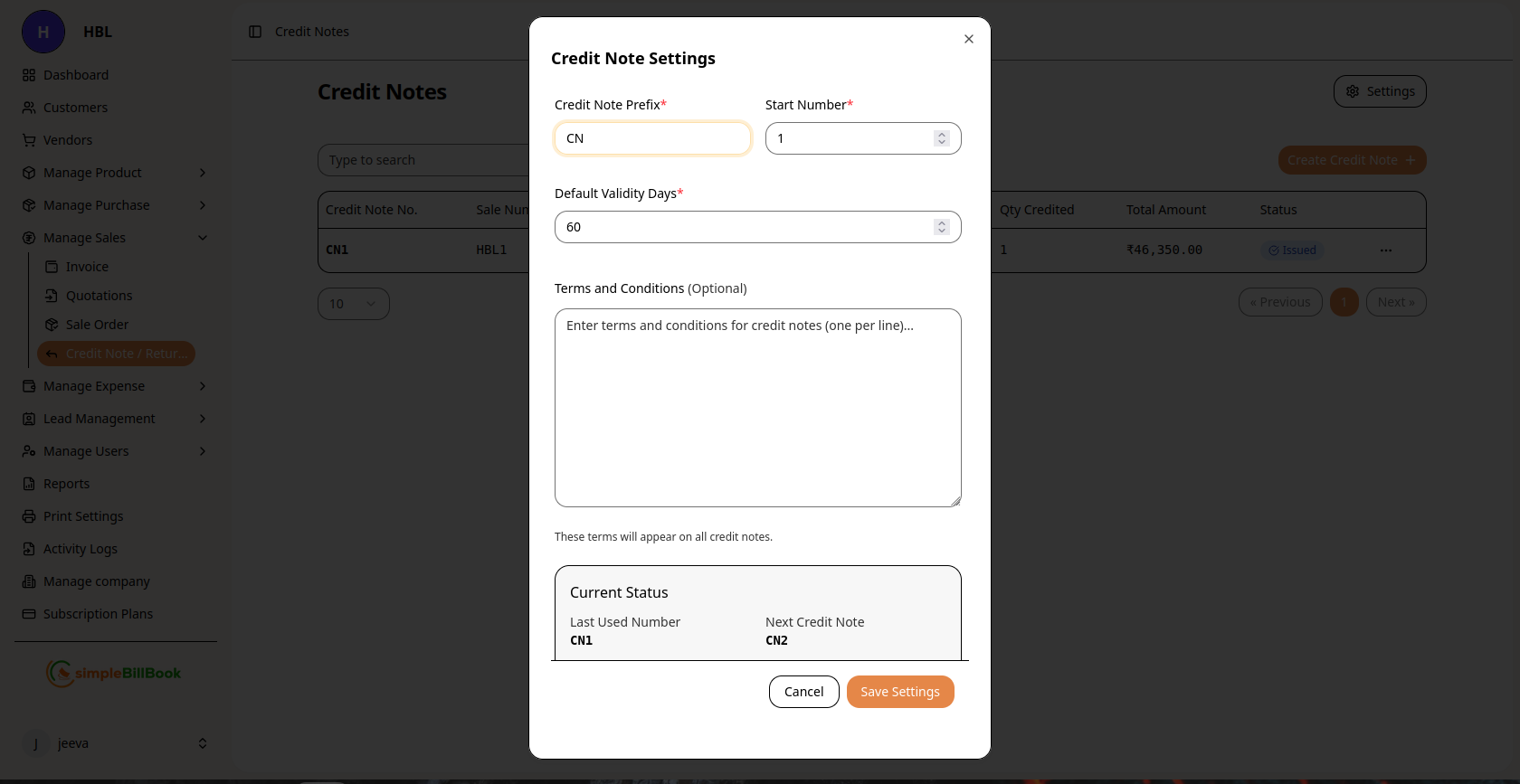 Figure 3: Configuration settings for credit notes
Configurable Settings:
Numbering System:
- Credit Note Prefix*: Custom prefix (default: "CN")
- Start Number*: Beginning sequence number (required)
- Last Used Number: System tracks last generated number
- Next Credit Note: Preview of next auto-generated number
Validity and Terms:
- Default Validity Days*: Number of days credit notes remain valid (default: 60)
- Terms and Conditions: Enter standard terms (one per line)
- Return Policies: Specify return conditions and timelines
- Refund Policies: Define refund processing terms
Process Settings:
- Default Status: Initial status for new credit notes
- Approval Requirements: Set approval workflows if needed
- Auto-Apply Credits: Automatically apply credits to customer accounts
Saving Settings:
- Click Save Settings to apply changes
- Use Cancel to discard modifications
- Settings affect all future credit notes
Credit Note Workflow
Typical Credit Note Lifecycle:
1. Creation Stage (Status: Draft)
- Credit note created with items and reasons
- Can be edited and modified
- Not yet communicated to customer
2. Review Stage (Status: Pending Review)
- Internal review for accuracy
- Manager approval if required
- Documentation verification
3. Issuance Stage (Status: Issued)
- Issued to customer
- Customer acknowledges receipt
- Credit available for use
4. Application Stage (Status: Applied)
- Credit applied to customer account
- Used against future purchases
- Or refund processed to customer
5. Refund Processing (Status: Refunded)
- Actual refund issued to customer
- Payment method recorded
- Transaction completed
6. Expiration Stage (Status: Expired)
- Validity period ended
- Credit no longer usable
- May be renewed in some cases
7. Cancellation Stage (Status: Cancelled)
- Credit note cancelled before use
- Reason documented
- Case closed
Types of Credit Notes
1. Sales Return Credit Notes
- Purpose: Process returns of sold goods
- Impact: Reduces sales revenue, increases inventory
- Conditions: Within return period, with original packaging
2. Price Adjustment Credit Notes
- Purpose: Correct pricing errors from original sales
- Impact: Adjusts revenue, maintains customer relationship
- Basis: Based on pricing agreements or errors
3. Quality Issue Credit Notes
- Purpose: Compensate for defective or unsatisfactory products
- Impact: Customer satisfaction, quality tracking
- Documentation: Often requires photos or inspection reports
4. Warranty Claim Credit Notes
- Purpose: Process warranty claims
- Impact: Honors warranty commitments
- Conditions: Must meet warranty terms and timelines
5. Goodwill Credit Notes
- Purpose: Maintain customer relationships
- Impact: Customer retention tool
- Approval: Often requires management approval
6. Discount Application Credit Notes
- Purpose: Apply discounts after sale
- Impact: Adjusts final sale price
- Basis: Promotional agreements or negotiations
Best Practices for Credit Note Management
Creating Effective Credit Notes:
- Clear Documentation: Include detailed reasons and supporting evidence
- Accurate Linking: Properly link to original sale invoice
- Correct Quantities: Verify return quantities match original sale
- Professional Communication: Maintain professional tone in notes
- Timely Processing: Process credit notes promptly after return received
Customer Communication:
- Clear Explanation: Explain reason for credit note clearly
- Multiple Options: Offer credit or refund options when possible
- Prompt Issuance: Issue credit notes quickly after return approval
- Follow-up: Confirm customer received and understands credit note
Internal Processes:
- Approval Workflow: Implement approval for significant credit notes
- Document Retention: Keep all supporting documents
- Regular Review: Review pending credit notes regularly
- Performance Tracking: Monitor credit note reasons for quality improvement
Inventory Management:
- Condition Assessment: Inspect returned goods for condition
- Proper Restocking: Return usable items to inventory appropriately
- Quality Tracking: Track return reasons for product quality analysis
- Supplier Claims: Process claims to suppliers for defective goods
Integration with Other Modules
Customer Management:
- Account Adjustments: Credit notes reduce customer receivable balances
- Customer History: Tracks all credits issued to each customer
- Relationship Management: Helps maintain positive customer relationships
Sales Management:
- Revenue Adjustment: Properly adjusts sales revenue
- Return Analysis: Tracks return rates by product or category
- Customer Satisfaction: Monitors issues leading to returns
Inventory Management:
- Stock Adjustment: Returned items increase inventory levels
- Quality Control: Tracks defective items by product or batch
- Supplier Performance: Links returns to specific suppliers if applicable
Financial Accounting:
- Revenue Correction: Adjusts revenue recognition
- Tax Adjustments: Handles tax reversals on returns
- Refund Processing: Manages actual cash refunds
Reporting and Analytics:
- Return Rate Analysis: Percentage of sales returned
- Reason Analysis: Most common reasons for returns
- Customer Return Patterns: Identifies frequent returners
- Product Quality Trends: Tracks quality issues over time
Common Scenarios and Solutions
Scenario 1: Partial Return of Sale
Solution:
- Create credit note for returned items only
- Keep sold items as completed sale
- Adjust original sale if needed
- Process refund or credit for returned portion
Scenario 2: Return Outside of Policy Period
Solution:
- Evaluate on case-by-case basis
- Consider goodwill credit if appropriate
- Document exception and approval
- Update policies if frequent occurrence
Scenario 3: Damaged Returned Goods
Solution:
- Assess damage and determine cause
- Issue credit based on condition assessment
- Consider partial credit for damaged goods
- Document damage with photos
Scenario 4: Customer Prefers Refund vs. Credit
Solution:
- Process actual refund if within policy
- Update credit note status to "Refunded"
- Record refund method and details
- Ensure proper accounting treatment
Scenario 5: Return Without Original Invoice
Solution:
- Verify sale through other means (customer account, product records)
- Consider store credit if sale cannot be verified
- Document verification process
- Update procedures to prevent future issues
Reports and Analytics
Available Credit Note Reports:
- Open Credit Notes: All credit notes not yet applied or refunded
- Credit Note Aging: How long credit notes have been outstanding
- Return Analysis: Returns by reason, product, or customer
- Refund Report: All refunds processed within period
- Customer Credit History: All credits issued to each customer
- Product Return Rate: Return percentage by product
Key Metrics to Monitor:
- Return Rate: Percentage of sales resulting in returns
- Credit Note Value: Average value of credit notes
- Processing Time: Average time to process returns
- Refund Rate: Percentage of credit notes converted to refunds
- Customer Satisfaction: Return reasons indicating satisfaction issues
Troubleshooting
Common Issues:
Q: Can't select items from a customer's sale. A: Ensure:
- Sale exists and is within return period
- Items haven't already been returned
- Customer account is active
Q: Credit note number isn't auto-generating. A: Check credit note settings and ensure "Next Credit Note" is properly configured.
Q: Inventory didn't increase after credit note creation. A: Verify:
- Credit note status is "Applied" or "Processed"
- Items were properly added to credit note
- Inventory settings allow restocking of returned items
Q: Customer says they never received credit. A: Check:
- Credit note was issued to correct customer
- Credit was applied to customer account
- Customer is checking correct account
Q: Need to modify credit note after issuing. A: Options:
- Cancel original and create new credit note
- Create additional credit note for adjustments
- Document all changes and reasons
Q: Credit note expired before customer used it. A: Check validity period in settings. Consider extending validity as exception if justified.
Advanced Features
Automated Return Processing:
- Set up automated credit note creation for approved returns
- Pre-defined credit amounts based on return reasons
- Streamlined approval workflows
Barcode Scanning for Returns:
- Scan product barcodes for quick return processing
- Auto-match to original sales
- Reduce manual entry errors
Integration with Payment Gateways:
- Automated refund processing to original payment method
- Refund status tracking
- Reconciliation with payment processors
Quality Analysis Tools:
- Track return reasons for quality improvement
- Supplier performance analysis for defective goods
- Product redesign feedback from returns
Customer Self-Service Portal:
- Customers initiate returns online
- Upload photos or documentation
- Track return status in real-time