Expense Product Management
Expense Product management in Hbl's simpleBillBook allows you to track products or services that are purchased for business consumption rather than for resale. These are items that become part of your business expenses rather than inventory.
Overview of Expense Products
Expense Products represent items or services you purchase for business operations that are not intended for resale to customers. They help you:
- Track Business Consumables: Office supplies, equipment, maintenance items
- Manage Service Expenses: Professional services, subscriptions, maintenance contracts
- Separate Inventory vs. Expenses: Clearly distinguish between products for resale and business consumption
- Accurate Cost Tracking: Properly allocate costs to expense categories
- Tax Compliance: Track HSN codes and GST rates for tax reporting
Viewing Expense Products
To view all expense products:
- Navigate to Manage Expense → Expense Product from the main sidebar
- You'll see a table listing all expense products in your system
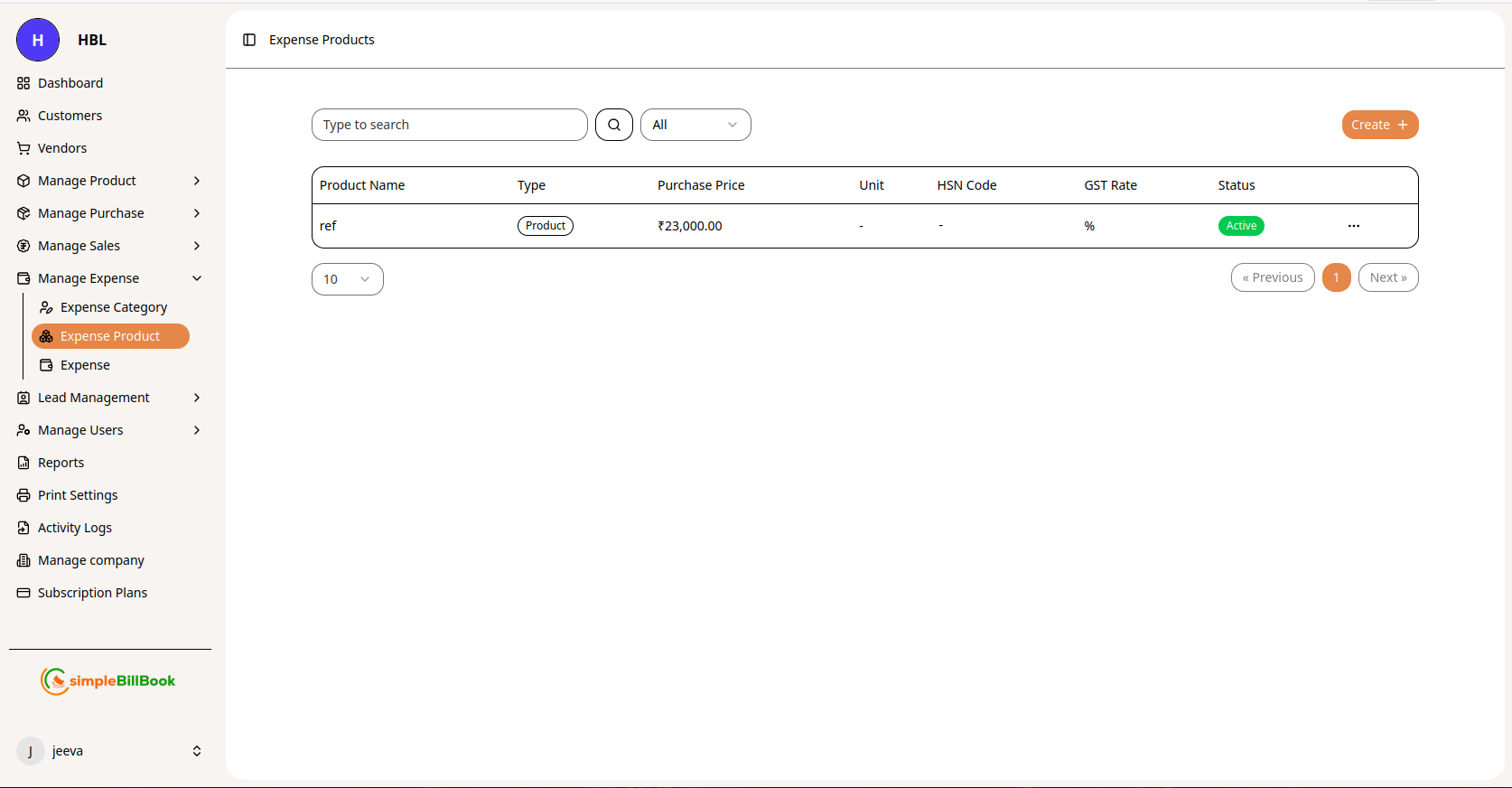 Figure 1: Expense products list showing all expense items with details
Expense Product Table Columns:
Product Information:
- Product Name: Name of the expense product or service
- Type: Usually "Product" or "Service"
- Purchase Price: Cost of the expense item
Tax and Compliance:
- Unit: Measurement unit (if applicable)
- HSN Code: Harmonized System of Nomenclature code for tax classification
- GST Rate: Applicable tax rate percentage
- Status: Active/Inactive status
Interface Elements:
- Type to search: Search functionality to find specific expense products
- Create +: Button to create new expense products
- Pagination: Navigation controls (« Previous, 1, Next »)
- Items per page: Display control (e.g., "10" items per page)
Creating a New Expense Product
Step 1: Access Expense Product Creation
From the expense products page, click the Create + button to add a new expense product.
Step 2: Fill Expense Product Details
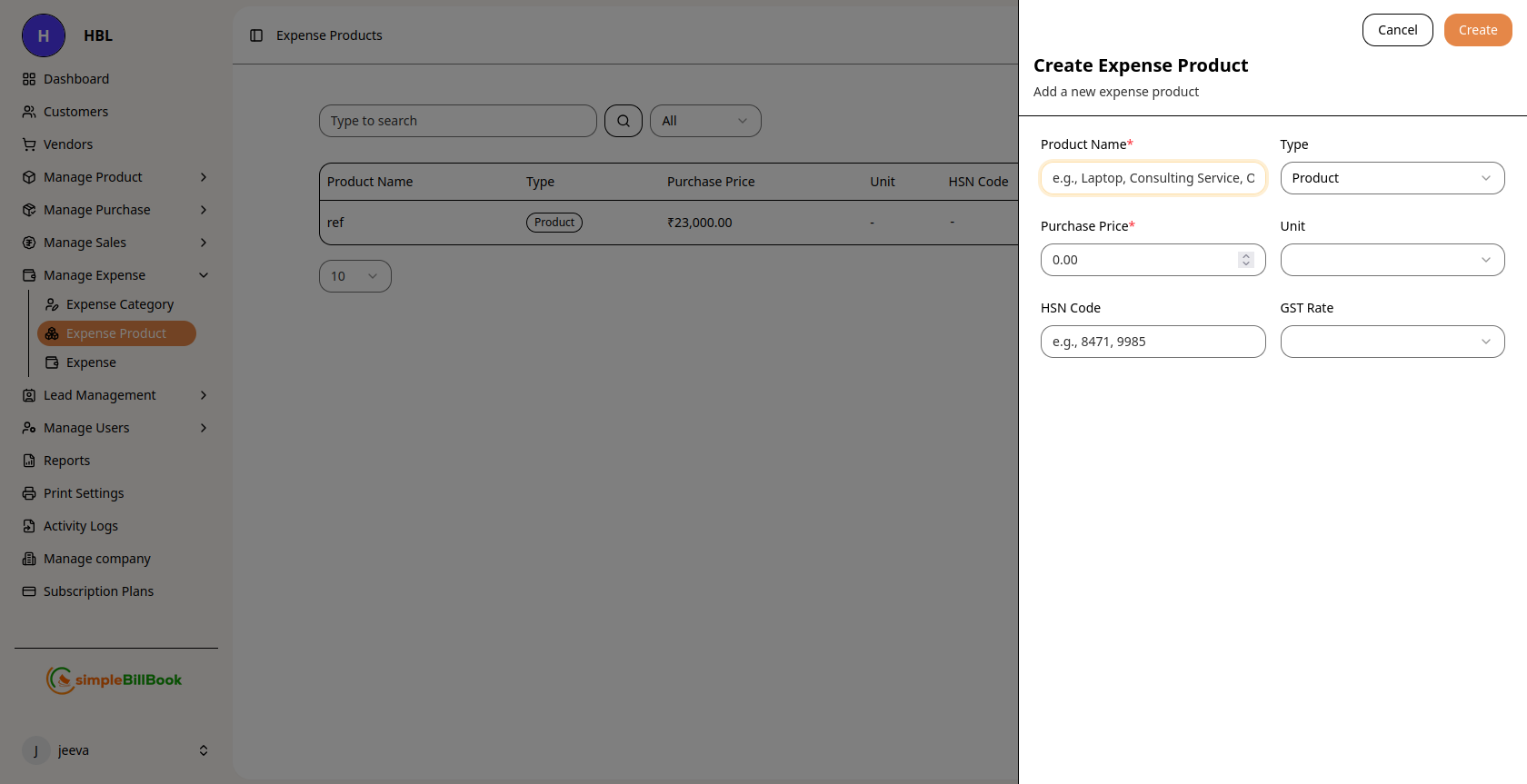 Figure 2: Form for creating new expense products
Required Information:
- Product Name*: Enter a descriptive name for the expense product (required)
- Purchase Price*: Enter the cost of the product or service (required)
Optional Information:
- Unit: Measurement unit (pieces, hours, liters, boxes, etc.)
- HSN Code: Tax classification code for GST reporting
- GST Rate: Applicable tax rate percentage
- Description: Additional details about the expense product
- Expense Category: Assign to an expense category for better tracking
Step 3: Save Expense Product
- Click Save or Create to add the expense product to your list
- The product will appear in the expense products table
- It will become available for selection in expense entries
Expense Products vs. Regular Products
| Feature | Regular Products | Expense Products |
|---|---|---|
| Purpose | For resale to customers | For business consumption |
| Inventory Tracking | Track stock levels | No stock tracking |
| Cost Impact | Cost of Goods Sold | Operating Expenses |
| Sales Integration | Appear in invoices | Not sold to customers |
| Purchase Type | Inventory purchases | Expense purchases |
| Tax Treatment | Output tax on sales | Input tax credits |
Common Expense Product Examples
Office Supplies:
- Printer paper, ink cartridges
- Stationery, pens, notebooks
- Filing supplies, folders
- Cleaning supplies
Technology & Equipment:
- Computer peripherals (keyboards, mice)
- Cables and adapters
- Small equipment under capitalization threshold
- Software subscriptions
Maintenance Items:
- Spare parts for equipment
- Lubricants, cleaning agents
- Tools and accessories
- Consumable supplies
Professional Services:
- Consulting hours
- Legal consultation
- Accounting services
- Training sessions
Facility Expenses:
- Light bulbs, fixtures
- Plumbing supplies
- Paint and maintenance materials
- Safety equipment
Best Practices for Expense Product Management
1. Clear Naming Conventions
- Use descriptive, consistent names
- Include brand or model when relevant
- Avoid abbreviations that may confuse users
2. Accurate Pricing
- Record actual purchase prices
- Update prices when they change
- Include taxes in price or track separately based on preference
3. Tax Compliance
- Maintain correct HSN codes for all products
- Apply appropriate GST rates
- Keep up-to-date with tax regulation changes
4. Categorization
- Assign expense products to appropriate expense categories
- Create logical groupings for similar products
- Review categorization periodically
5. Regular Maintenance
- Review expense product list periodically
- Deactivate unused products rather than deleting
- Archive products no longer purchased
Integration with Expense Management
Using Expense Products in Expense Entries:
- When creating an expense entry, select from expense products
- System auto-fills purchase price, HSN code, and GST rate
- Expense product selection determines expense categorization
- Tax calculations are applied based on product settings
Benefits of Using Expense Products:
- Consistency: Standardized product information across expense entries
- Efficiency: Quick selection of frequently purchased items
- Accuracy: Prevents data entry errors in pricing and tax codes
- Reporting: Better tracking of specific expense items
- Compliance: Consistent tax treatment across similar purchases
Common Scenarios and Solutions
Scenario 1: One-Time Purchase vs. Recurring Expense
Solution: Create expense products for recurring purchases; use one-time descriptions for unique purchases.
Scenario 2: Price Changes Over Time
Solution: Update purchase price in expense product record to reflect current rates.
Scenario 3: Multiple Units of Measurement
Solution: Define standard unit and convert as needed during expense entry.
Scenario 4: Services vs. Physical Products
Solution: Both can be created as expense products with appropriate unit measures (hours, days, etc.).
Reports and Analytics
Available Expense Product Reports:
- Expense Product Usage: How often each expense product is purchased
- Expense Product Cost Trend: Price changes over time
- Expense by Product Category: Spending grouped by product type
- Tax Summary: GST/HSN code analysis for expense products
Key Metrics to Monitor:
- Most Purchased Expense Products: Identify frequently used items
- Expense Product Cost Changes: Track inflation or supplier price changes
- Category Distribution: Which expense categories have the most products