Lead Management
Lead management in simpleBillBook helps you track potential customers, monitor conversion rates, and manage the sales pipeline effectively. This guide covers creating leads, tracking their status, analyzing performance metrics, and managing follow-ups.
Viewing Lead Dashboard
To view the lead dashboard:
- Navigate to Lead Management → Leads Dashboard from the main sidebar
- You'll see a comprehensive view of your lead performance and conversion metrics
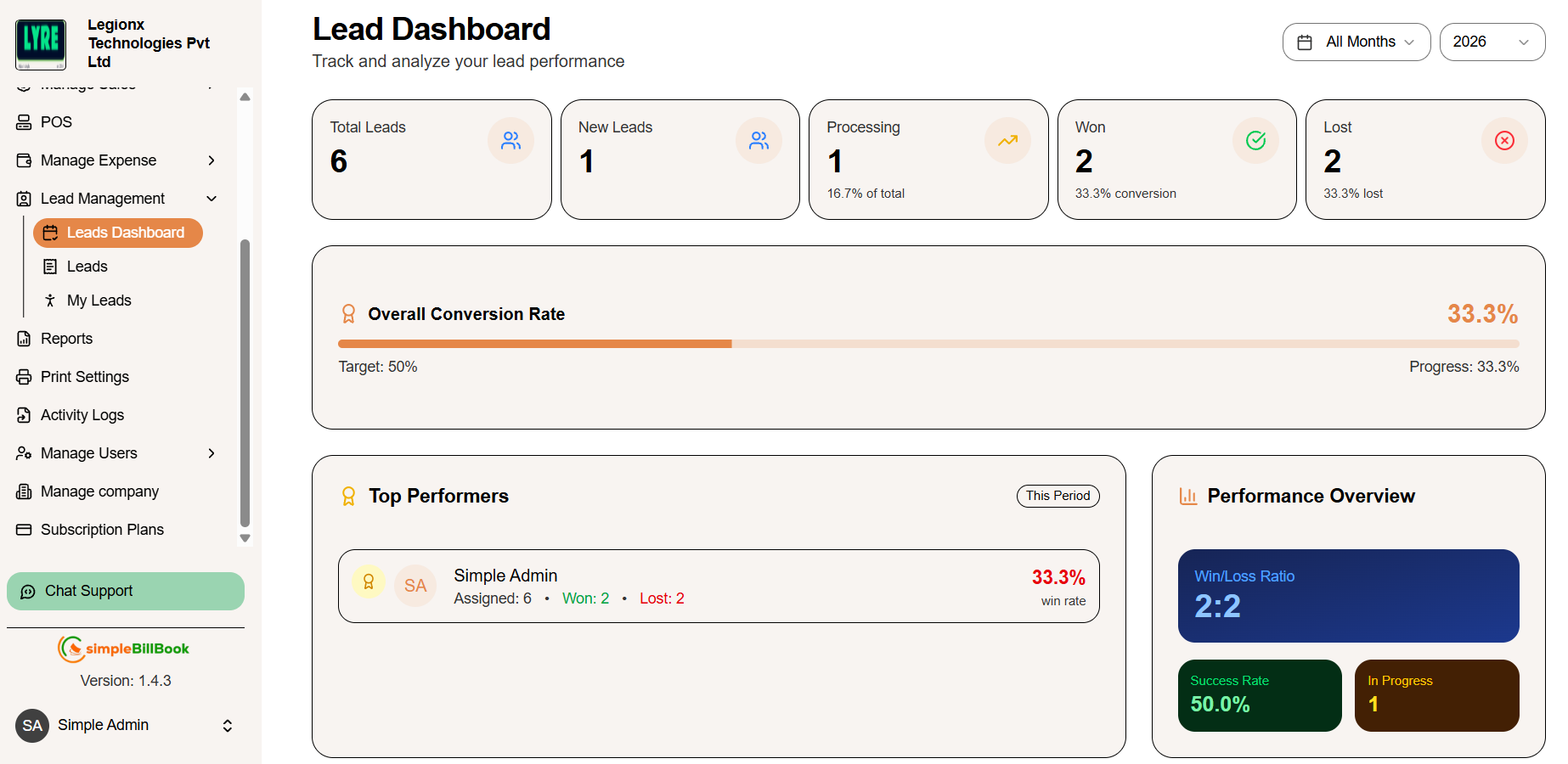 Figure 1: Lead dashboard showing key metrics and performance analytics
Header Section
- Store Name: sk Stores
- Title: Lead Dashboard
- Subtitle: Track and analyze your lead performance
Key Metrics Cards
| Metric | Value | Trend/Detail |
|---|---|---|
| Total Leads | 6 | ↑12.5% vs last month |
| New Leads | 1 | ↑12.5% vs last month |
| Processing | 1 | 0.0% of total |
| Won | 1 | 50.0% conversion |
| Lost | 0 | 0.0% lost |
Performance Analytics
Overall Conversion Rate
- Target: 50%
- Progress: 50.0%
Top Performers
- sanshosh
- Assigned: 2 leads
- Won: 1
- Lost: 0
Performance Overview
- Win/Loss Ratio: 1:0
- Success Rate: 100.0%
- In Progress: 0
Monthly Performance Table
| Month | Total Leads | Won | Lost | Conversion Rate | Performance |
|---|---|---|---|---|---|
| Mar | 2 | 1 | 0 | 50.0% | Good |
Footer Information
- Year: 2026
- View: All Months
Viewing All Leads
To view all leads:
- Navigate to Lead Management → Leads from the main sidebar
- You'll see a comprehensive list of all leads with their details
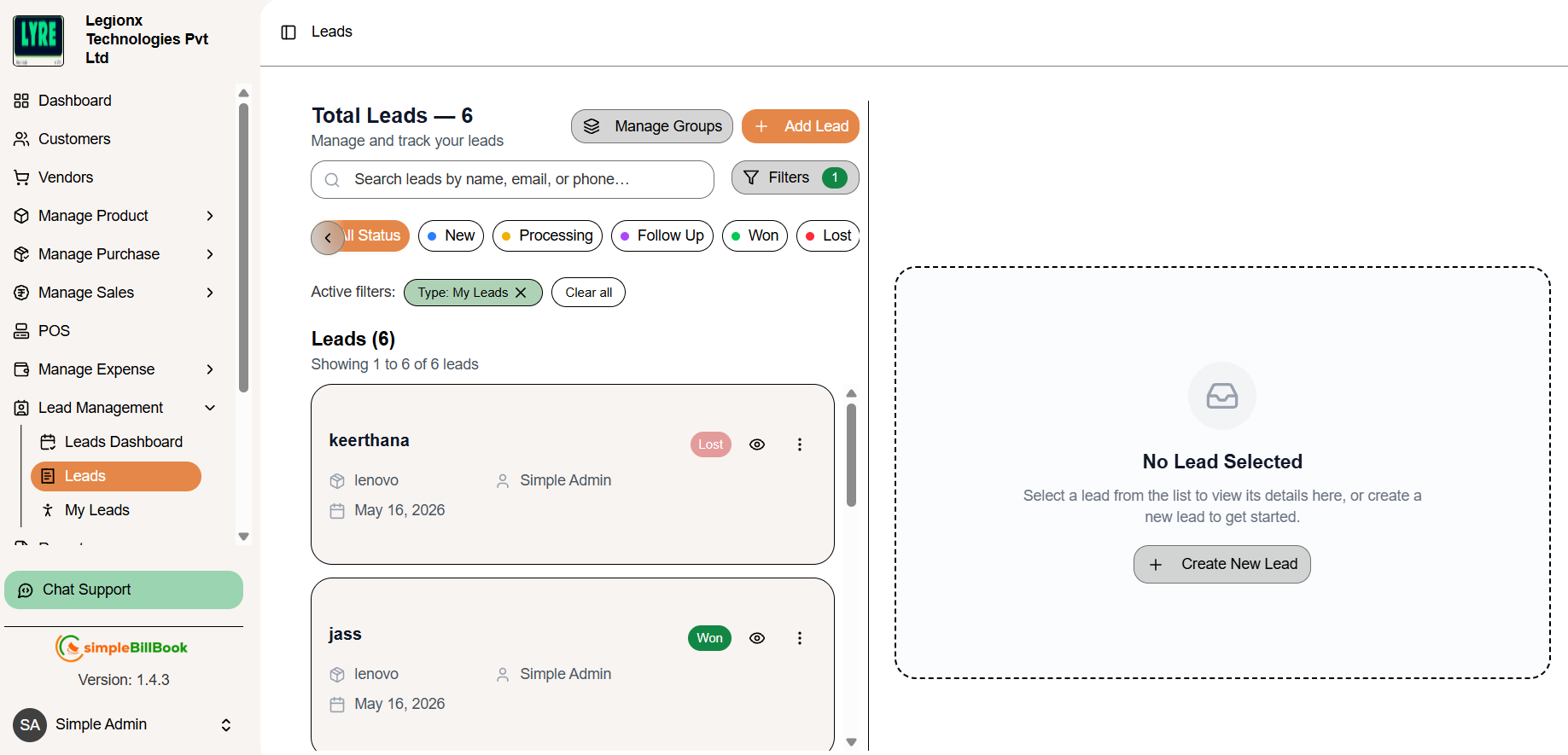 Figure 2: Leads list showing all potential customers
Summary Tabs
| Token | Description |
|---|---|
| Total Leads | Total number of available leads |
| Manage Groups | Create and manage lead groups |
| Add Lead | Create a new lead entry |
| Search Bar | Search leads using name, email, or phone |
| Filters | Apply filters to refine lead results |
| All Status | Show leads from all statuses |
| New | Recently created leads |
| Processing | Leads currently in progress |
| Follow Up | Leads requiring follow-up actions |
| Won | Successfully converted leads |
| Lost | Leads marked as unsuccessful |
| Active Filters | Display currently applied filters |
| Clear All | Remove all applied filters |
| Leads Count | Total leads displayed in the list |
| Lead Card | Shows lead information and status |
| Status Badge | Indicates current lead status |
| View Icon | View lead details |
| More Options | Access additional lead actions |
| No Lead Selected | Indicates no lead is currently selected |
| Create New Lead | Open form to add a new lead |
| Version | Displays current application version |
| Profile Section | Shows logged-in user information |
Search Field
- Placeholder: Searches by name, email, or phone...
Leads List
Showing 1 to 2 of 2 leads
Lead 1: saran
- Product: samsung a30s
- Assigned To: santhosh
- Phone: 7636362652
- Email: saran12@gmail.com
- Date: Mar 12, 2026
Lead 2: bharath
- Product: moto g7
- Assigned To: santhosh
- Phone: 9383473872
- Email: bharath@gmail.com
- Date: Mar 12, 2026
Action Buttons
- Add New Lead: Create a new lead entry
- Filters: Filter leads by various criteria
Sidebar Navigation
- Dashboard
- Customers
- Vendors
- Manage Product
- Manage Purchase
- Manage Sales
- Manage Expense
- Lead Management
- Leads Dashboard
- Leads
- Manage Users
- POS
- Reports
- Print Settings
- Activity Logs
- Manage company
- Subscription Plans
Footer Information
- simpleBillBook Version: 1.4
- Current User: sarthosh
Creating a New Lead
To create a new lead:
- Navigate to Lead Management → Leads from the main sidebar
- Click the Add New Lead button to open the lead creation form
- Fill in the required details and click Save
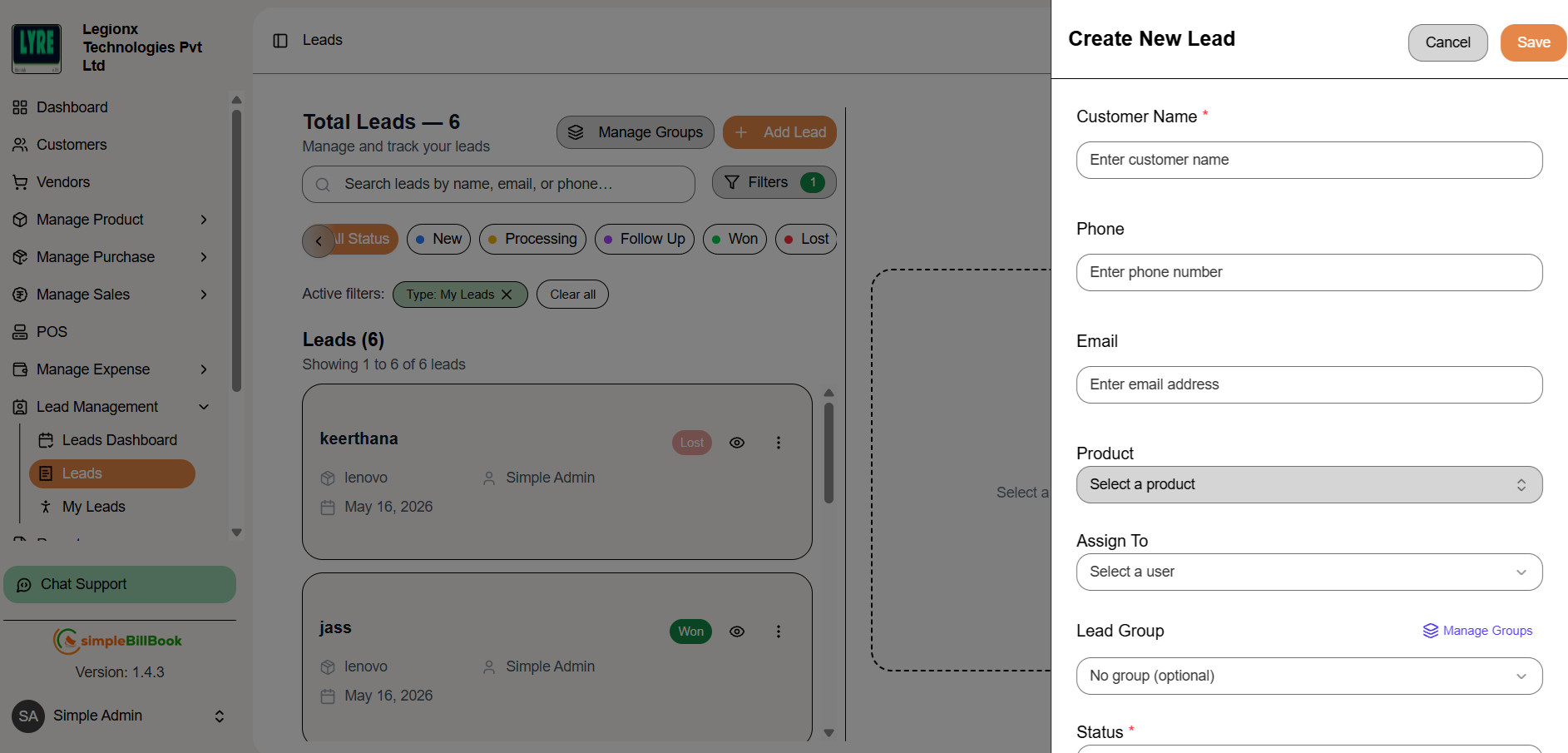 Figure 3: Form for creating new lead entries
Header Section
- Store Name: sk Stores
- Title: Leads
- Subtitle: Manage and track your leads
Summary Metrics
- Total Leads: 2
- Processing: 0
- Won Leads: 0
Leads List Preview
- saran: samsung a30s, sarthosh, 763636252, saan12@gmail.com
- bharath: moto g7, sarthosh, 9383473872, bharath@gmail.com
Create New Lead Form
Form Actions
- Cancel: Discard changes
- Save: Save the new lead
Required Fields:
| Field | Type | Placeholder/Options |
|---|---|---|
| Customer Name * | Text | Enter customer name |
| Phone | Text | Enter phone number |
| Text | Enter email address | |
| Product | Dropdown | Select a product |
| Assign To | Dropdown | Select a user |
| Lead Group | Group leads for easy management (optional) | Select a lead group |
| Status * | Dropdown | Created (Default) |
Additional Field:
- Notes: Text area for adding notes about the lead
- Placeholder: "Add any notes about this lead..."
- Helper text: "Add any specific requirements, follow-up details, or important information about this lead."
Step 3: Save Lead
After filling all details, click Save to create the lead entry. The system will:
- Add lead to the leads list
- Make lead available for assignment
- Update dashboard metrics
Understanding Lead Status Workflow
Common Status Types
| Status | Description |
|---|---|
| New | Newly created lead |
| Follow Up | Lead awaiting further communication |
| Processing | Lead is under follow-up |
| Won | Successfully converted to customer |
| Lost | Lead did not convert |
Status Definitions and Next Actions
| Status | Description | Next Actions |
|---|---|---|
| New | Newly created lead | Contact and qualify the lead |
| Follow Up | Lead awaiting further communication | Schedule and continue follow-up |
| Processing | Under follow-up | Continue discussions |
| Won | Converted to customer | Create sales order |
| Lost | Not converted | Analyze reason |
Tracking Performance Metrics
Key Metrics to Monitor
-
Conversion Rate: Percentage of leads converted to customers
- Current Target: 50%
- Current Progress: 50.0% (1 out of 2 leads converted)
-
Win/Loss Ratio: Ratio of won vs lost leads
- Current Ratio: 1:0
-
Success Rate: Percentage of processed leads that won
- Current Rate: 100.0%
-
Team Performance: Individual sales rep metrics
- sanshosh: 2 assigned, 1 won, 0 lost
Monthly Review
| Month | Total Leads | Won | Lost | Conversion Rate | Performance |
|---|---|---|---|---|---|
| Mar | 2 | 1 | 0 | 50.0% | Good |
Best Practices for Lead Management
Lead Capture
- Complete Information: Always capture full contact details (name, email, phone)
- Product Interest: Record specific products/services (samsung a30s, moto g7)
- Assignment: Assign leads to appropriate sales representatives
- Initial Notes: Document first conversation details
Follow-up Management
- Timely Response: Contact leads within 24 hours
- Regular Updates: Update status after each interaction
- Note Taking: Document all conversations and requirements
- Next Steps: Always schedule next follow-up
Status Management
- Accurate Status: Keep lead status current
- Timely Updates: Update immediately after interactions
- Lost Analysis: Record reasons for lost leads
- Win Tracking: Note what worked for won leads
My Leads
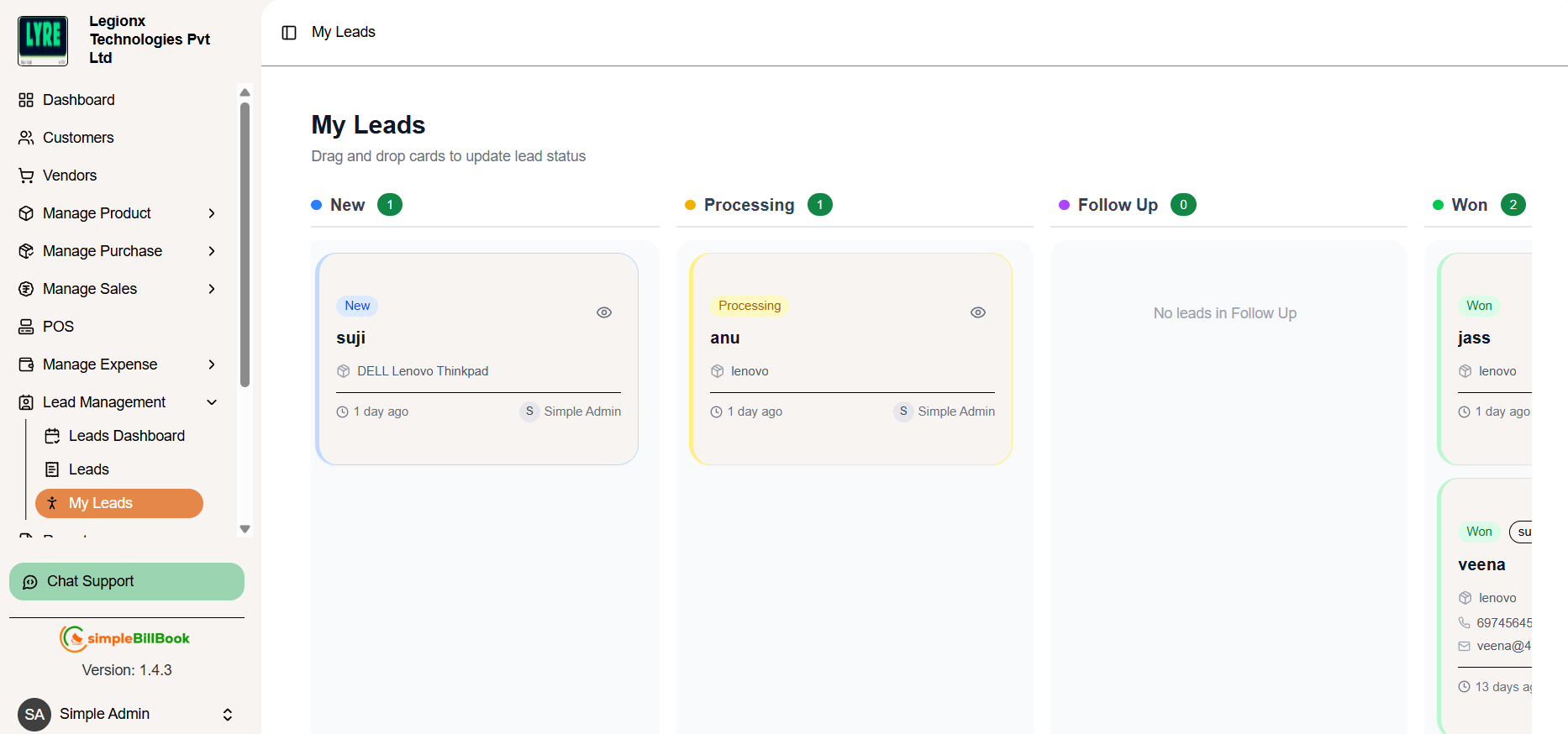
- View and manage assigned leads
- Drag and drop lead cards to update status
- Track leads using different stages
- View lead count for each status
- Monitor lead progress easily
- View customer and product details
- Check assigned user information
- Open lead details using view option
- Identify empty lead sections quickly
Integration with Other Modules
Sales Management
- Customer Creation: Convert won leads to customers
- Sales Orders: Generate orders from converted leads
Inventory Management
- Product Availability: Check stock for interested products
- Special Requests: Handle product-specific inquiries
Communication
- Email Integration: Send emails directly from lead record
- Call Logging: Track phone conversations
User Management
- Assign Leads: Distribute leads among team members
- Performance Tracking: Monitor individual sales rep performance
Common Scenarios and Solutions
Scenario 1: Lead Not Responding
Solution:
- Try different communication channels
- Space out follow-up attempts (3-5 attempts)
- Document all contact attempts
- Consider moving to lost after maximum attempts
Scenario 2: Hot Lead Ready to Buy
Solution:
- Prioritize immediate follow-up
- Prepare quotes quickly
- Fast-track conversion process
- Create customer record promptly
Scenario 3: Duplicate Lead Entries
Solution:
- Search before creating new leads
- Merge duplicate records if detected
- Maintain clean database
- Train team on proper entry procedures
Scenario 4: Lead Re-engagement
Solution:
- Review previous interactions
- Update contact information
- Start fresh with new approach
- Reset status appropriately
Configuring Lead Settings
Available Settings
- Lead Numbering: Configure lead ID format
- Default Status: Set default status for new leads (default: Created)
- Default Assignee: Auto-assign rules
- Follow-up Reminders: Configure notification preferences
Display Settings
- List View: Customize visible columns
- Sort Order: Set default sorting
- Date Format: Choose date display format
Managing Users
To manage users:
- Navigate to Lead Management → Manage Users from the main sidebar
- Add new sales representatives
- Assign roles and permissions
- Set lead assignment rules
- Monitor individual performance
User Roles
- Administrators: Full access to all modules
- Managers: View reports and manage team
- Sales Reps: Access assigned leads only
System Information
Version
- simpleBillBook Version: 1.4
Current User
- sarthosh (as shown in leads page)
- sanshosh (as shown in top performers)
Store Information
- Store Name: sk Stores
Conclusion
Effective lead management is crucial for business growth. The simpleBillBook lead management system provides:
- Centralized lead database with complete contact information
- Real-time performance tracking through interactive dashboard
- Conversion analytics with win/loss ratios and success rates
- Team performance monitoring for individual sales representatives
- Seamless integration with sales and inventory processes
- Monthly performance tracking with performance ratings (Good)
- User management for team-based lead assignment
- Clear visibility of won leads (1 out of 2 converted)
Regular use of these features helps businesses:
- Improve conversion rates through data-driven decisions
- Track sales performance across team members
- Better allocate sales resources based on performance
- Increase revenue predictability through pipeline visibility
- Maintain organized customer follow-up schedules
- Analyze monthly trends for strategic planning
- Monitor individual and team performance metrics