Activity Logs
The Activity Logs feature in simpleBillBook helps you track and monitor all system activities, user actions, and changes across different modules. This guide covers how to view, filter, and analyze activity logs for better system oversight and audit trail management.
Viewing Activity Logs
To view activity logs:
- Navigate to Activity Logs from the main sidebar
- You'll see a comprehensive table of all system activities and changes inside your company
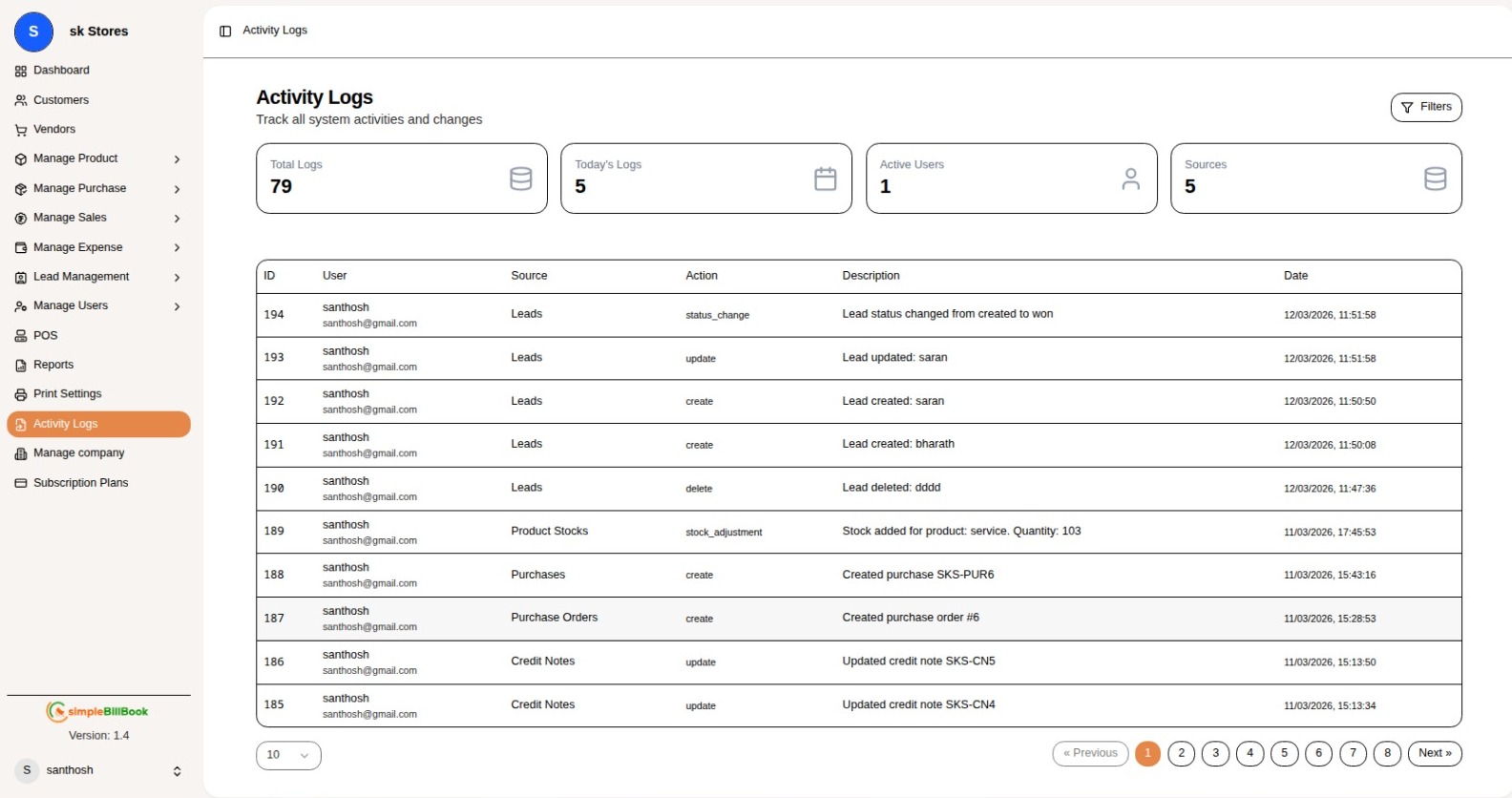 Figure 1: Activity logs showing system activities and user actions
Header Section
- Title: Activity Logs
- Subtitle: Track all system activities and changes
Summary Tabs
| Tab | Description |
|---|---|
| Total Logs | All system activities |
| Today's Logs | Activities from current day |
| Active Users | Currently active users |
| Sources | Activity sources/modules |
Activity Logs Table
The table displays the following columns:
| Column | Description |
|---|---|
| ID | Unique identifier for each activity |
| User | User name and email who performed the action |
| Source | Module where action occurred |
| Action | Type of action performed |
| Description | Detailed information about the activity |
| Date | Date and time of activity |
Sample Log Entries
| ID | User | Source | Action | Description | Date |
|---|---|---|---|---|---|
| 194 | santhosh santhosh@gmail.com | Leads | status_change | Lead status changed from created to won | 12/03/2026, 11:51:58 |
| 193 | santhosh santhosh@gmail.com | Leads | update | Lead updated: saran | 12/03/2026, 11:51:58 |
| 192 | santhosh santhosh@gmail.com | Leads | create | Lead created: saran | 12/03/2026, 11:50:50 |
| 191 | santhosh santhosh@gmail.com | Leads | create | Lead created: bharath | 12/03/2026, 11:50:08 |
| 190 | santhosh santhosh@gmail.com | Leads | delete | Lead deleted: dddd | 12/03/2026, 11:47:36 |
| 189 | santhosh santhosh@gmail.com | Product Stocks | stock_adjustment | Stock added for product: service. Quantity: 103 | 11/03/2026, 17:45:53 |
| 188 | santhosh santhosh@gmail.com | Purchases | create | Created purchase SKS-PUR6 | 11/03/2026, 15:43:16 |
| 187 | santhosh santhosh@gmail.com | Purchase Orders | create | Created purchase order #6 | 11/03/2026, 15:28:53 |
| 186 | santhosh santhosh@gmail.com | Credit Notes | update | Updated credit note SKS-CN5 | 11/03/2026, 15:13:50 |
Activity Sources
The following modules/sources generate activity logs:
| Source | Description |
|---|---|
| Leads | Lead management activities |
| Product Stocks | Inventory stock adjustments |
| Purchases | Purchase transactions |
| Purchase Orders | Purchase order activities |
| Credit Notes | Credit note creation and updates |
Action Types
Common action types tracked in the system:
| Action Type | Description |
|---|---|
| create | New record created |
| update | Existing record updated |
| delete | Record deleted |
| status_change | Status modified |
| stock_adjustment | Inventory quantity adjusted |
Pagination
The activity logs table includes pagination controls for navigating through multiple pages:
- Previous: Go to previous page
- Page Numbers: 1, 2, 3, 4, 5, 6, 7...
- Next: Go to next page
Showing 10 entries per page by default
Filtering Activity Logs
By Tab Selection
Click on the summary tabs to filter logs:
- Total Logs: View all activities
- Today's Logs: View only today's activities
- Active Users: View activities by active users
- Sources: Filter by specific modules
By Date Range
Activities can be filtered by date:
- Specific date selection
- Date range selection
- Today, This Week, This Month options
By User
Filter activities by specific users:
- Select user from dropdown
- View all activities by particular user
By Source/Action
Filter by:
- Module/Source (Leads, Purchases, etc.)
- Action type (create, update, delete, etc.)
Understanding Log Entries
Lead Management Activities
| Action | Description Example |
|---|---|
| status_change | "Lead status changed from created to won" |
| update | "Lead updated: saran" |
| create | "Lead created: saran" |
| delete | "Lead deleted: dddd" |
Inventory Activities
| Action | Description Example |
|---|---|
| stock_adjustment | "Stock added for product: service. Quantity: 103" |
Purchase Activities
| Action | Description Example |
|---|---|
| create | "Created purchase SKS-PUR6" |
| create | "Created purchase order #6" |
Credit Note Activities
| Action | Description Example |
|---|---|
| update | "Updated credit note SKS-CN5" |
| update | "Updated credit note SKS-CN4" |
User Information
Each log entry includes user details:
- User Name: santhosh
- User Email: santhosh@gmail.com
Best Practices for Activity Logs
Regular Monitoring
- Daily Review: Check today's logs for unusual activities
- User Activity: Monitor individual user actions
- Critical Changes: Review status changes and deletions
Audit Trail
- Compliance: Maintain logs for audit purposes
- History Tracking: Track changes to important records
- Accountability: Identify who performed specific actions
Security Monitoring
- Suspicious Activity: Monitor for unauthorized access attempts
- Data Integrity: Track unexpected deletions or modifications
- User Behavior: Analyze patterns of system usage
Common Use Cases
Case 1: Tracking Lead Conversion
Scenario: Monitor when and who converted leads Solution:
- Filter by Source: Leads
- Filter by Action: status_change
- Review descriptions for "changed from created to won"
Case 2: Investigating Data Changes
Scenario: Determine who deleted a lead Solution:
- Filter by Source: Leads
- Filter by Action: delete
- Search for specific lead name in description
Case 3: Stock Adjustment Audit
Scenario: Review inventory changes Solution:
- Filter by Source: Product Stocks
- Filter by Action: stock_adjustment
- Review quantities added/removed
Case 4: Purchase History
Scenario: Track purchase creations Solution:
- Filter by Source: Purchases or Purchase Orders
- Filter by Action: create
- Review purchase numbers and details
Integration with Other Modules
Lead Management
- Track lead creation, updates, and status changes
- Monitor lead deletions
- Review conversion activities
Inventory Management
- Monitor stock adjustments
- Track product quantity changes
- Review inventory movements
Purchase Management
- Track purchase order creation
- Monitor purchase transactions
- Review credit note updates
User Management
- Track user activities
- Monitor system access
- Review user-specific actions
Conclusion
The Activity Logs feature in simpleBillBook provides:
- Complete Audit Trail: Track all system activities inside your company
- User Accountability: Identify who performed actions
- Module-wise Tracking: Filter by specific sources
- Action Monitoring: Track creates, updates, deletes
- Timestamp Records: Exact date and time of activities
- Pagination: Easy navigation through large datasets
- Comprehensive Details: User, source, action, description
Regular use of activity logs helps businesses:
- Maintain audit compliance
- Monitor user activities
- Track critical changes
- Investigate issues
- Ensure data integrity
- Improve security oversight
Remember to review activity logs regularly, set up alerts for critical actions, and maintain proper access controls to ensure system security and accountability.