செயல்பாட்டு பதிவுகள்
simpleBillBook இல் உள்ள செயல்பாட்டு பதிவுகள் (Activity Logs) அம்சம், அனைத்து கணினி செயல்பாடுகள், பயனர் செயல்கள் மற்றும் பல்வேறு தொகுதிகளில் நிகழும் மாற்றங்களை கண்காணிக்கவும் நிர்வகிக்கவும் உதவுகிறது. இந்த வழிகாட்டி, செயல்பாட்டு பதிவுகளை எப்படி பார்ப்பது, வடிகட்டுவது மற்றும் பகுப்பாய்வு செய்வது என்பதைக் கொண்டு சிறந்த கணினி கண்காணிப்பு மற்றும் ஆய்வு பதிவேடு மேலாண்மையை விளக்குகிறது.
செயல்பாட்டு பதிவுகளைப் பார்ப்பது
செயல்பாட்டு பதிவுகளைப் பார்க்க:
- முக்கிய பக்கப்பட்டியில் (Main Sidebar) இருந்து Activity Logs பகுதிக்கு செல்லவும்
- உங்கள் நிறுவனத்தின் உள்ளேயுள்ள அனைத்து கணினி செயல்பாடுகள் மற்றும் மாற்றங்களின் முழுமையான அட்டவணையைப் பார்ப்பீர்கள்
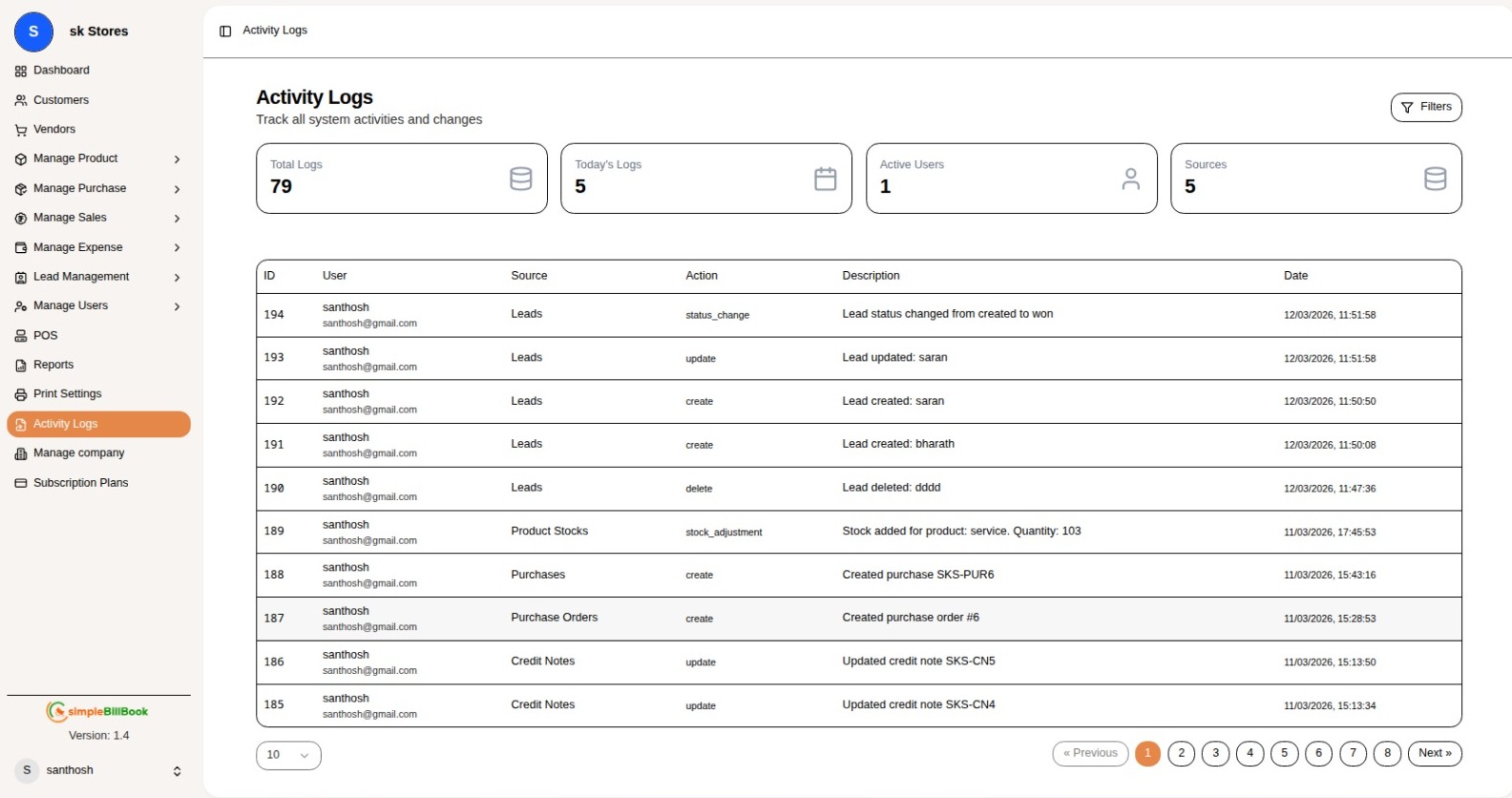 படம் 1: கணினி செயல்பாடுகள் மற்றும் பயனர் செயல்களை காட்டும் செயல்பாட்டு பதிவுகள்
தலைப்பு பகுதி
- தலைப்பு: செயல்பாட்டு பதிவுகள்
- துணைத் தலைப்பு: அனைத்து கணினி செயல்பாடுகள் மற்றும் மாற்றங்களை கண்காணிக்கவும்
சுருக்கத் தாவல்கள்
| தாவல் | விளக்கம் |
|---|---|
| மொத்த பதிவுகள் | அனைத்து கணினி செயல்பாடுகள் |
| இன்றைய பதிவுகள் | தற்போதைய நாளின் செயல்பாடுகள் |
| செயலில் உள்ள பயனர்கள் | தற்போது செயலில் உள்ள பயனர்கள் |
| மூலங்கள் | செயல்பாட்டு மூலங்கள் / தொகுதிகள் |
செயல்பாட்டு பதிவுகள் அட்டவணை
அட்டவணை பின்வரும் நெடுவரிசைகளை காட்டுகிறது:
| நெடுவரிசை | விளக்கம் |
|---|---|
| ID | ஒவ்வொரு செயல்பாட்டிற்குமான தனிப்பட்ட அடையாள எண் |
| பயனர் | செயலை செய்த பயனரின் பெயர் மற்றும் மின்னஞ்சல் |
| மூலம் | செயல் நடைபெற்ற தொகுதி |
| செயல் | செய்யப்பட்ட செயலின் வகை |
| விளக்கம் | செயல்பாட்டின் விரிவான தகவல் |
| தேதி | செயல்பாட்டின் தேதி மற்றும் நேரம் |
மாதிரி பதிவு உள்ளீடுகள்
| ID | பயனர் | மூலம் | செயல் | விளக்கம் | தேதி |
|---|---|---|---|---|---|
| 194 | santhosh santhosh@gmail.com | Leads | status_change | Lead நிலை created இலிருந்து won ஆக மாற்றப்பட்டது | 12/03/2026, 11:51:58 |
| 193 | santhosh santhosh@gmail.com | Leads | update | Lead புதுப்பிக்கப்பட்டது: saran | 12/03/2026, 11:51:58 |
| 192 | santhosh santhosh@gmail.com | Leads | create | Lead உருவாக்கப்பட்டது: saran | 12/03/2026, 11:50:50 |
| 191 | santhosh santhosh@gmail.com | Leads | create | Lead உருவாக்கப்பட்டது: bharath | 12/03/2026, 11:50:08 |
| 190 | santhosh santhosh@gmail.com | Leads | delete | Lead நீக்கப்பட்டது: dddd | 12/03/2026, 11:47:36 |
| 189 | santhosh santhosh@gmail.com | Product Stocks | stock_adjustment | பொருளுக்கான இருப்பு சேர்க்கப்பட்டது: service. அளவு: 103 | 11/03/2026, 17:45:53 |
| 188 | santhosh santhosh@gmail.com | Purchases | create | Purchase உருவாக்கப்பட்டது SKS-PUR6 | 11/03/2026, 15:43:16 |
| 187 | santhosh santhosh@gmail.com | Purchase Orders | create | Purchase order உருவாக்கப்பட்டது #6 | 11/03/2026, 15:28:53 |
| 186 | santhosh santhosh@gmail.com | Credit Notes | update | Credit note புதுப்பிக்கப்பட்டது SKS-CN5 | 11/03/2026, 15:13:50 |
செயல்பாட்டு மூலங்கள்
பின்வரும் தொகுதிகள் / மூலங்கள் செயல்பாட்டு பதிவுகளை உருவாக்குகின்றன:
| மூலம் | விளக்கம் |
|---|---|
| Leads | Lead மேலாண்மை செயல்பாடுகள் |
| Product Stocks | இருப்பு சரிசெய்தல் செயல்பாடுகள் |
| Purchases | கொள்முதல் பரிவர்த்தனைகள் |
| Purchase Orders | கொள்முதல் ஆர்டர் செயல்பாடுகள் |
| Credit Notes | Credit note உருவாக்கம் மற்றும் புதுப்பிப்புகள் |
செயல் வகைகள்
கணினியில் பொதுவாக கண்காணிக்கப்படும் செயல் வகைகள்:
| செயல் வகை | விளக்கம் |
|---|---|
| create | புதிய பதிவு உருவாக்கப்பட்டது |
| update | ஏற்கனவே உள்ள பதிவு புதுப்பிக்கப்பட்டது |
| delete | பதிவு நீக்கப்பட்டது |
| status_change | நிலை மாற்றப்பட்டது |
| stock_adjustment | இருப்பு அளவு சரிசெய்யப்பட்டது |
பக்க மாற்றம் (Pagination)
செயல்பாட்டு பதிவுகள் அட்டவணையில் பல பக்கங்களுக்கு இடையே செல்ல பக்க மாற்ற கட்டுப்பாடுகள் உள்ளன:
- Previous: முந்தைய பக்கத்திற்குச் செல்ல
- Page Numbers: 1, 2, 3, 4, 5, 6, 7...
- Next: அடுத்த பக்கத்திற்குச் செல்ல
இயல்பாக ஒரு பக்கத்திற்கு 10 பதிவுகள் காட்டப்படும்
செயல்பாட்டு பதிவுகளை வடிகட்டுதல்
தாவல் தேர்வின் மூலம்
பதிவுகளை வடிகட்ட சுருக்கத் தாவல்களை கிளிக் செய்யவும்:
- Total Logs: அனைத்து செயல்பாடுகளையும் பார்க்க
- Today's Logs: இன்றைய செயல்பாடுகளை மட்டும் பார்க்க
- Active Users: செயலில் உள்ள பயனர்களின் செயல்பாடுகளை பார்க்க
- Sources: குறிப்பிட்ட தொகுதிகளின் அடிப்படையில் வடிகட்ட
தேதி வரம்பின் மூலம்
செயல்பாடுகளை தேதியின் அடிப்படையில் வடிகட்டலாம்:
- குறிப்பிட்ட தேதி தேர்வு
- தேதி வரம்பு தேர்வு
- இன்று, இந்த வாரம், இந்த மாதம் போன்ற விருப்பங்கள்
பயனர் மூலம்
குறிப்பிட்ட பயனர்களின் செயல்பாடுகளை வடிகட்ட:
- பட்டியலில் இருந்து பயனரைத் தேர்வு செய்யவும்
- குறிப்பிட்ட பயனரின் அனைத்து செயல்பாடுகளையும் பார்க்கவும்
மூலம் / செயல் அடிப்படையில்
பின்வருவனவற்றின் அடிப்படையில் வடிகட்டலாம்:
- தொகுதி / மூலம் (Leads, Purchases போன்றவை)
- செயல் வகை (create, update, delete போன்றவை)
பதிவு உள்ளீடுகளைப் புரிந்துகொள்வது
Lead மேலாண்மை செயல்பாடுகள்
| செயல் | விளக்க உதாரணம் |
|---|---|
| status_change | "Lead நிலை created இலிருந்து won ஆக மாற்றப்பட்டது" |
| update | "Lead புதுப்பிக்கப்பட்டது: saran" |
| create | "Lead உருவாக்கப்பட்டது: saran" |
| delete | "Lead நீக்கப்பட்டது: dddd" |
இன்வென்டரி செயல்பாடுகள்
| செயல் | விளக்க உதாரணம் |
|---|---|
| stock_adjustment | "பொருளுக்கான இருப்பு சேர்க்கப்பட்டது: service. அளவு: 103" |
கொள்முதல் செயல்பாடுகள்
| செயல் | விளக்க உதாரணம் |
|---|---|
| create | "Purchase உருவாக்கப்பட்டது SKS-PUR6" |
| create | "Purchase order உருவாக்கப்பட்டது #6" |
Credit Note செயல்பாடுகள்
| செயல் | விளக்க உதாரணம் |
|---|---|
| update | "Credit note புதுப்பிக்கப்பட்டது SKS-CN5" |
| update | "Credit note புதுப்பிக்கப்பட்டது SKS-CN4" |
பயனர் தகவல்
ஒவ்வொரு பதிவு உள்ளீட்டிலும் பயனர் விவரங்கள் அடங்கும்:
- பயனர் பெயர்: santhosh
- பயனர் மின்னஞ்சல்: santhosh@gmail.com
செயல்பாட்டு பதிவுகளுக்கான சிறந்த நடைமுறைகள்
வழக்கமான கண்காணிப்பு
- தினசரி ஆய்வு: அசாதாரண செயல்பாடுகளுக்காக இன்றைய பதிவுகளை சரிபார்க்கவும்
- பயனர் செயல்பாடு: தனிப்பட்ட பயனர்களின் செயல்களை கண்காணிக்கவும்
- முக்கிய மாற்றங்கள்: நிலை மாற்றங்கள் மற்றும் நீக்கல்களை பரிசீலிக்கவும்
ஆய்வு பதிவேடு (Audit Trail)
- இணக்கம் (Compliance): ஆய்வு தேவைகளுக்காக பதிவுகளை பராமரிக்கவும்
- வரலாறு கண்காணிப்பு: முக்கிய பதிவுகளில் நிகழும் மாற்றங்களை கண்காணிக்கவும்
- பொறுப்புணர்வு: குறிப்பிட்ட செயல்களை யார் செய்தார்கள் என்பதை அடையாளம் காணவும்
பாதுகாப்பு கண்காணிப்பு
- சந்தேகத்திற்கிடமான செயல்பாடு: அனுமதியற்ற அணுகல் முயற்சிகளை கண்காணிக்கவும்
- தரவு ஒருமை: எதிர்பாராத நீக்கல்கள் அல்லது மாற்றங்களை கண்காணிக்கவும்
- பயனர் நடத்தை: கணினி பயன்பாட்டின் பழக்கவழக்கங்களை பகுப்பாய்வு செய்யவும்